Create new entry
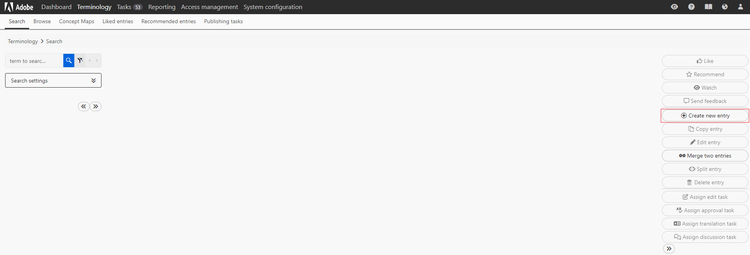
If you need to add a term to the database, you can do this by selecting the Create new entry button.
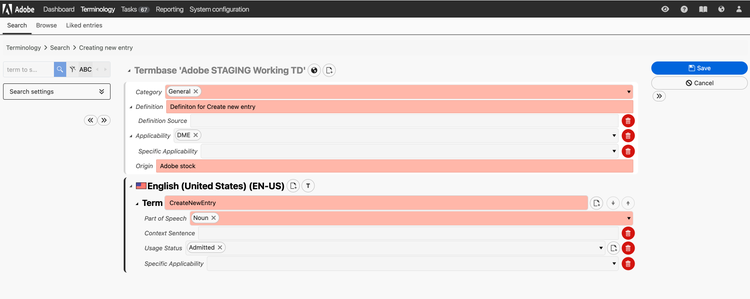
There are also multiple additional metadata fields on both the entry, term and language levels that are not shown by default.
You can access them by clicking the page symbol, highlighted here in blue.
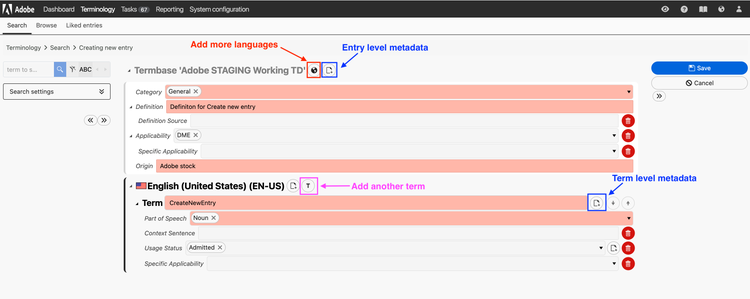
You can also add extra languages by clicking the globe button (highlighted in red) and provide an additional term within the same entry (synonym for example) by clicking the T button (highlighted in pink).
Once you're happy with the term you can hit Save and the entry will be sent to the Terminology team for review before being released into the term database.
Draft entries
While the above process will cover most use-cases, we are aware that the Content Strategy team may want to create an entry and keep it in the draft status while they discuss internally and gather input from other stakeholders.
We have provisioned for this by adding in a Workflow Status called CS Draft. In fact, the default Workflow Status for Content Strategists will automatically be set to CS Draft.
When creating an entry that does not need to stay in draft status, Content Strategists must set the Workflow Status to In progress to ensure it is correctly kicked off for review by the Terminology team.
Once the Content Strategist is happy with the term and no longer needs to keep it in Draft status, they can change the Workflow Status to In progress and this will trigger it being passed on to the Terminology team for final approval to be added to the TD.